Flameshot
Powerful yet simple-to-use screenshot software.
Installation
Section titled “Installation”sudo apt install flameshotflameshot [flameshot-options] [arguments]Usage: flameshot [flameshot-options] [arguments]
Options:
-h, --help Displays this help
-v, --version Displays version information
Arguments:
gui Start a manual capture in GUI mode.
screen Capture a single screen.
full Capture the entire desktop.
launcher Open the capture launcher.
config Configure flameshot.Examples
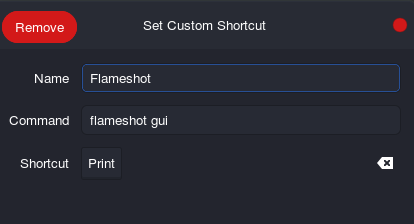
Section titled “Examples”Bind flameshot under ‘prtcs’ button
Section titled “Bind flameshot under ‘prtcs’ button”